Why DBH Crypto Watcher?
🇨🇭 Swiss Quality & Ironclad Privacy
Developed in Switzerland by Dominique E. Blake-Hofer, this app respects your data like a Swiss bank vault. Zero address tracking, no registration, and no privacy-invasive trackers for your holdings. All portfolio math is done exclusively on your local device. Your wallet addresses are never stored anywhere else.
🔗 Multi-Chain & Smart V2 Token Recognition
Track major coins like BTC, ETH, SOL, LTC, DOGE, TRX, ADA, XRP, AVAX, DOT, and full EVM support for Arbitrum, Optimism, Base, and BSC. Stop manually adding contract addresses: Our advanced Smart V2 engine automatically detects assets like USDT, USDC, LINK, and WSTETH residing in your wallets.
📈 NEW: Profit/Loss Tracker & ROI Analysis*
Record your individual purchases in the integrated order book. The app automatically calculates your average buy price and real-time ROI (absolute and percentage). An intelligent balance match feature detects deviations caused by staking rewards, airdrops, or transaction fees.
📊 Smart Dashboard & Interactive Widgets
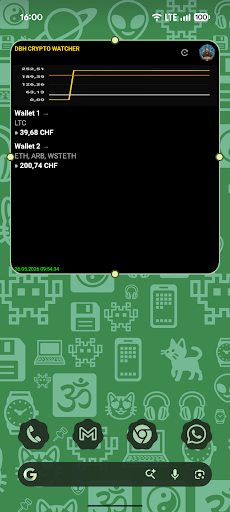
View all your wallets in one compact, scrollable Android widget. Your central hub instantly shows if individual wallet values are rising or falling. See your balances in CHF, USD, EUR, GBP, AUD, or JPY with real-time exchange rates. Fully translated into EN, DE, FR, and IT.
📖 App Guide & Synchronization Process
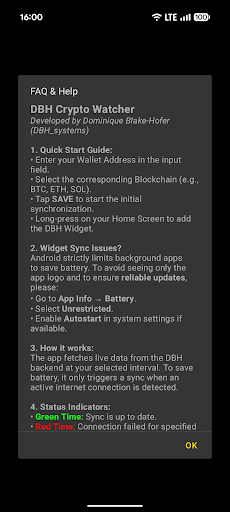
1. Setup & Configuration
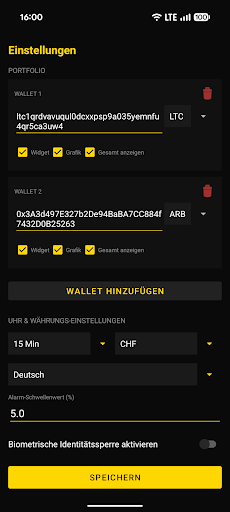
After installing the app on your smartphone, you can add any number of public wallet addresses (e.g., Bitcoin, Ethereum, Solana) and assign custom names to them. Thanks to our advanced Smart V2 engine, token balances (such as USDT, USDC, LINK, or WSTETH) are automatically detected in the background – removing the need to manually enter complex contract addresses. In the app settings, define your primary fiat currency (CHF, USD, EUR, GBP, AUD, JPY) for portfolio conversion. You can also add scrollable widgets to your home screen for quick updates.
2. How does the Synchronization work?
To maximize your privacy, all calculations and multiplications are processed exclusively locally on your end device. The app connects via encrypted channels to our secure Swiss API backend. Our backend queries the balance data via public blockchain nodes (RPCs) and verified Etherscan connections, returning only the raw balance values to your app. Market rates are updated on the server every 5 minutes and provided via an optimized cache layer. The free version updates background widgets every 8 hours, whereas PRO subscribers unlock real-time priority sync and manual "Pull-to-Refresh" gestures.
3. Wear OS Smartwatch Integration
Install the DBH Crypto Watcher app directly onto your watch via the Google Play Store. Open the smartphone app and trigger the one-time pairing process to transfer your locally stored wallet configurations encrypted to the smartwatch. Following this initial setup, the Wear OS app runs 100% independently (Standalone)! The watch no longer requires a permanent Bluetooth bond to your phone and fetches balances directly via Wi-Fi or cellular networks (LTE/4G). You can also configure interactive complications directly on your watch face.
🆘 Need Help or Technical Support?
If you find difficulties configuring your wallets, face issues with syncing, or encounter a technical problem, we are here to assist you. You can open an official support ticket at any time by sending an email to support@blake-hofer.net. Our technical support team will review your request and get back to you personally as soon as possible.
App Screenshots

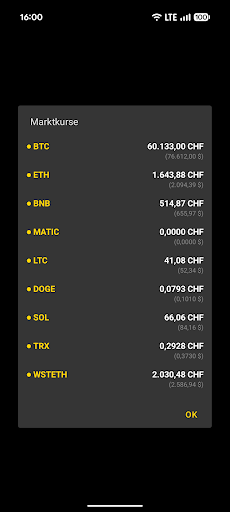
 BTC: $62,379.00
  ETH: $1,661.92
  BNB: $574.78
  MATIC: $0.0763
  LTC: $41.87
  DOGE: $0.0785
  SOL: $68.95
  TRX: $0.3312
  ARB: $0.0778
  BASE: $0.0000
  OP: $0.1020
  ADA: $0.1469
  XRP: $1.09
  AVAX: $6.40
  DOT: $0.8989
  USDT: $0.9987
  USDC: $0.9998 |